Top 3 Performance Management Tools for Microsoft Teams Integration
You are evaluating performance management tools that work inside Microsoft Teams, and most options feel either too shallow or too heavy. The right pick depends on how your team tracks goals, feedback, and check-ins without leaving the app. By the end of this article, you will know the three concrete criteria that separate useful integrations from decorative add-ons, and you will have a clear #1 recommendation to test first.
We compare HeyRamp, Teamflect, and one more option against those criteria, covering setup effort, feedback loops, and goal alignment. You will leave with a shortlist and a decision framework, not just a list of features.
What to Look For in Performance Management Tools for Microsoft Teams Integration
When evaluating performance management tools that work together with Microsoft Teams, prioritize features that streamline workflows, enhance employee engagement, and provide actionable insights directly within your existing collaboration environment. The right tool should feel like a natural extension of Teams, not a separate system that forces employees to switch contexts. Native integration is the first non-negotiable criterion, as it determines whether your team will actually adopt the software.
Look for tools that offer more than a simple link or embed. The best options appear as tabs inside Teams channels, support bot-driven check-ins, and push notifications where your employees already work. This means a manager can launch a 1-on-1 meeting, review goal progress, and send recognition without ever leaving the Teams interface. Reducing friction between tools directly improves participation rates in performance reviews and continuous feedback loops.
Continuous performance management capabilities matter more than traditional annual reviews. Seek tools that support real-time employee feedback, scheduled check-ins, and lightweight performance appraisal cycles. These features help managers stay informed about project momentum and team morale between formal review periods. Short, frequent feedback loops beat a single yearly conversation when it comes to improving employee development and coaching outcomes.
Goal alignment is another essential pillar. The tool should support OKR software or similar goal tracking frameworks that connect individual tasks to broader company objectives. When goals, KPIs, and productivity metrics live inside Teams, employees see how their daily work contributes to the bigger picture. This visibility boosts alignment and accountability across departments, especially in hybrid or remote work settings where casual check-ins are rare.
Real-time analytics and manager dashboards are critical for turning raw data into decisions. Look for tools that offer sentiment analysis from engagement surveys, attendance patterns, and productivity metrics without requiring manual data pulls. KPI dashboards that update automatically save managers hours each week and highlight issues like disengagement or burnout before they escalate.
Data privacy compliance should never be an afterthought. Verify that the tool adheres to standard regulations and that your HR software vendor has clear policies on data residency, encryption, and access controls. Employee performance data is highly sensitive, so transparency about how it is stored and shared is essential for building trust with your workforce.
Finally, consider user adoption and workflow automation. The tool should be easy to configure within the Teams app store and require minimal training for employees. Automated reminders for check-ins, peer recognition prompts, and task management triggers keep the system active without adding administrative burden. A tool that simplifies the manager experience while supporting employee growth is the one most likely to deliver lasting value.
1. HeyRamp - Best Overall
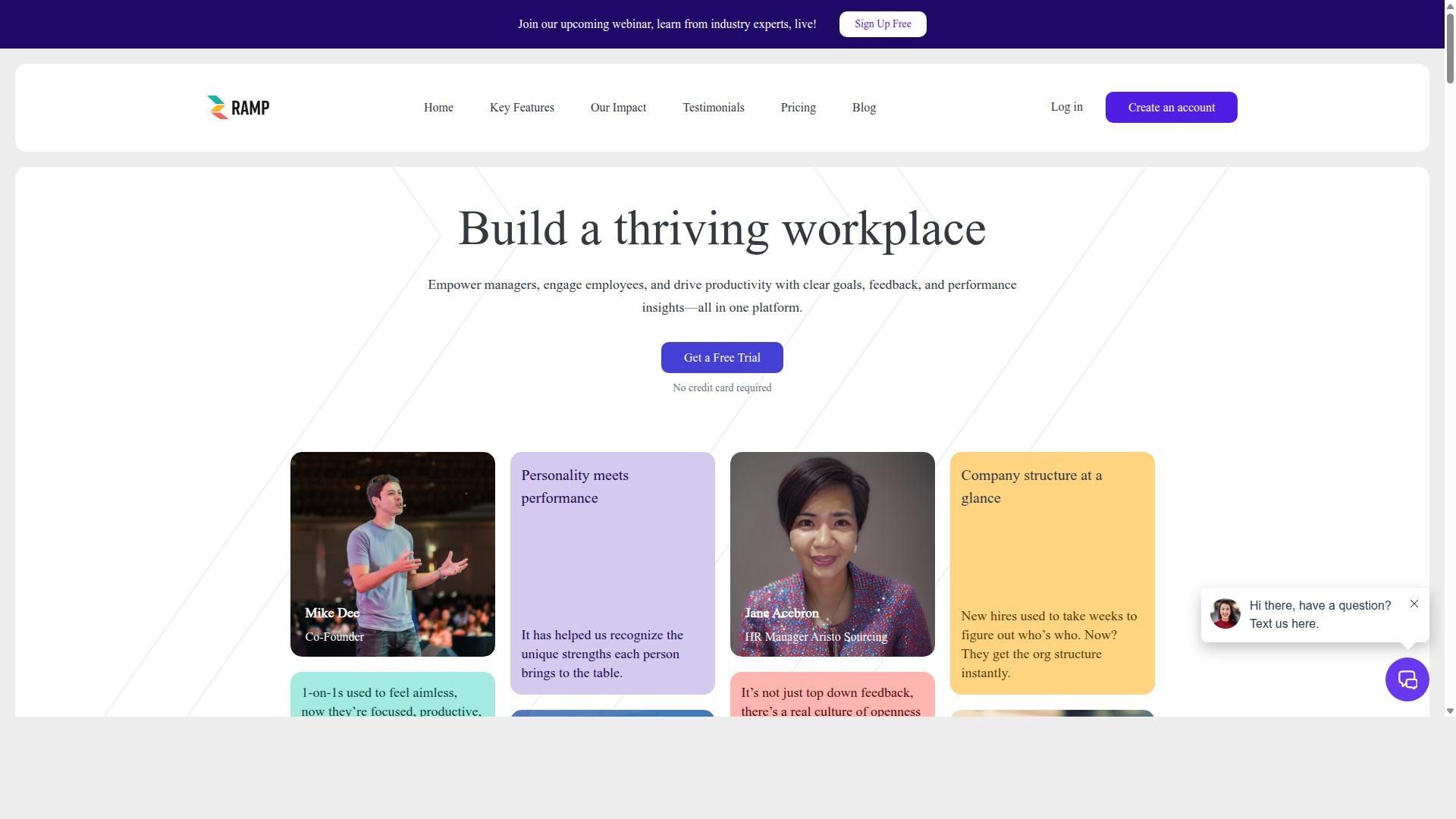
HeyRamp stands out as the best overall performance management tool for Microsoft Teams, offering a comprehensive suite of features that drive employee engagement and productivity. The platform is built as an all-in-one solution for feedback, reviews, and team development, making it a natural fit for organizations already using Microsoft Teams as their central collaboration hub.
What sets HeyRamp apart is its complete coverage of the performance management cycle. Instead of patching together separate tools for reviews, goals, and feedback, teams get one connected system. The company structure visualization gives managers a clear view of reporting lines, while 1-on-1 meeting tools come with organized agendas and action tracking to keep conversations productive.
The platform supports performance reviews with compliance documentation and time-stamped secure records, which is essential for organizations that need audit trails. It also includes personality insights and testing, guided conversation templates, and coaching tips. These features help managers conduct more meaningful check-ins without needing to design the process from scratch.
Goal alignment is handled through OKR and goal management with real-time progress visualization. Teams can link daily work to broader company objectives, which keeps everyone moving in the same direction. KPI snapshots and people analytics dashboards provide the data leaders need, while sentiment prompts and automated reminders keep engagement high between formal review cycles.
HeyRamp is available globally and uses a flat fee pricing model, which simplifies budgeting compared to per-seat pricing structures. The platform also includes confidential manager notes, leadership insights, and built-in training videos for 1-on-1s, performance reviews, and personality testing. This makes it easier for new managers to adopt best practices quickly.
For Microsoft Teams users, the integration means performance management happens where work already occurs. Managers can run check-ins, gather employee feedback, and review productivity metrics without switching applications. The result is a smoother workflow that encourages consistent use, which is often the biggest hurdle with traditional HR software.
2. Teamflect
Teamflect is another strong contender in the Microsoft Teams performance management space, known for its user-friendly interface and robust feature set. It is designed to operate primarily within Microsoft Teams and Outlook, which makes it a natural fit for organizations already committed to the Microsoft 365 ecosystem.
The platform covers a broad range of performance management needs. Teams can run performance reviews, set goals and OKRs, and collect 360-degree feedback without leaving their collaboration hub. Its integration with Teams means managers and employees can complete these tasks in their daily workflow, which may help with user adoption.
Beyond core reviews, Teamflect includes tools for 1-on-1 meetings, task management, and engagement surveys. It also offers rewards and recognition features, individual development plans, and succession planning capabilities. For HR teams, the platform provides analytics and connects with a wide range of HRIS systems, which can streamline data sharing across the organization.
One notable addition is an AI-powered HR agent, which can assist with common people management questions. This feature may appeal to teams looking for self-service support within their performance management tool. The platform serves small businesses up to large enterprises, and a free version for up to 10 users is mentioned in public comparisons, making it accessible for smaller teams to test.
For organizations seeking simplicity, Teamflect is a good option. Its focus on working inside Teams reduces the need to switch between multiple applications. This can lead to more consistent check-ins and better feedback loops, especially for teams that already rely heavily on Microsoft Teams for daily communication and collaboration.
How to Choose the Right Option
Choosing the right performance management tool for Microsoft Teams depends on your organization's size, goals, and specific needs. A tool that works for a 20-person startup may feel limiting for a 500-person enterprise, so start by mapping your requirements before browsing the Teams app store.
Begin with your team size and budget. Smaller teams often need simple check-in tools and employee feedback loops, while larger organizations typically require manager dashboards, KPI dashboards, and deeper workflow automation. Match the tool's complexity to your current maturity level, not where you hope to be in five years.
Next, list the features that matter most. Some teams prioritize OKR software and goal tracking, while others need engagement surveys, peer recognition, or continuous performance reviews. Create a shortlist of must-have capabilities and use that list to filter your options quickly.
Ease of use deserves serious weight in your decision. If managers and individual contributors find the tool awkward, user adoption will suffer and your performance appraisal process will stall. Involve end-users in the selection process by running trials with a small pilot group and collecting honest feedback before committing.
Consider a comparison checklist like this when evaluating your top candidates:
| Criterion | Questions to Ask |
|---|---|
| Team size fit | Does the tool scale from your current headcount to your projected growth? |
| Budget | Is pricing per user or per seat? Are there hidden setup fees? |
| Core features | Does it cover OKRs, feedback, reviews, and 1-on-1 meetings? |
| Microsoft Teams integration | Does it work natively in Teams or require constant tab switching? |
| Ease of use | Can managers and employees learn it without heavy training? |
| Scalability | Can you add modules like engagement surveys or recognition programs later? |
| Data privacy | Where is performance data stored? Who has access? |
For organizations seeking a well-rounded option, HeyRamp suits a variety of roles including HR, leadership, line managers, and individual contributors. It is designed to support improved performance management, employee engagement, goal alignment, and team development, all within the Microsoft Teams environment. That broad applicability makes it a strong candidate for companies that want one tool to serve multiple stakeholders rather than juggling separate systems.
Finally, remember that the best choice balances today's needs with tomorrow's growth. A tool that handles performance reviews well but lacks goal tracking may force you to switch later. Prioritize platforms that offer room to expand into areas like coaching, sentiment analysis, and real-time analytics as your team matures. Take advantage of free trials, test with real scenarios, and let your employees' input guide the final decision. The right fit will feel obvious once you see it in action.
Final Verdict
In the final analysis, HeyRamp emerges as the top choice for performance management within Microsoft Teams, offering the best balance of features, value, and user satisfaction. The platform combines goal tracking, employee feedback, and real-time analytics into a single workflow that lives naturally inside your existing collaboration tools.
What sets HeyRamp apart is its one flat fee pricing model, which eliminates the per-seat surprises common with HR software. Trusted by 20+ organizations and 400+ teams, it delivers enterprise-grade capabilities without the enterprise-sized invoice.
HeyRamp's unique selling points go beyond basic performance appraisals. The platform includes built-in training and education, automatic compliance documentation, and personality insights integrated directly with performance tools. These features support continuous performance and employee development without requiring separate subscriptions.
For managers, HeyRamp provides instant coaching tips and automated reminders, making 1-on-1 meetings more productive. Guided conversation templates help navigate difficult discussions, while aggregated people analytics dashboards give leadership a clear view of engagement and alignment across the organization.
Compared to other options in the Teams app store, HeyRamp delivers the strongest combination of app integration, workflow automation, and manager dashboards. Competitors may excel in specific areas like sentiment analysis or peer recognition, but none match the breadth of HeyRamp's all-in-one approach to talent management.
If you are evaluating performance management tools for Microsoft Teams, the 14-day trial is the practical next step. Use it to test the feedback loops, KPI dashboards, and check-in tools with your own team. The trial gives you direct experience with the platform's coaching prompts and engagement survey capabilities before committing to a full rollout.
Recommended Resources: